A well designed home office supports concentration, reduces fatigue, and helps maintain consistent work routines. Even small adjustments in layout, lighting, furniture, and organization can significantly improve productivity. The goal is to create a workspace that encourages focus while remaining comfortable for long hours of use.
This guide explains practical home office setup ideas that help improve efficiency and support better daily performance.
Choose the Right Location for Your Workspace
The location of your workspace influences how effectively you can concentrate throughout the day. A dedicated area reduces distractions and creates a professional working environment.
Helpful placement strategies include:
- Selecting a quiet corner away from household activity
- Positioning the desk near natural light when possible
- Avoiding high traffic areas inside the home
- Keeping the workspace separate from relaxation zones
A defined workspace helps signal the brain that it is time to focus on tasks.
Invest in a Comfortable and Supportive Chair
Comfortable seating plays a major role in maintaining productivity during long working hours. Poor posture can quickly reduce concentration and increase fatigue.
Important chair features to consider include:
- Adjustable seat height
- Proper lumbar support
- Breathable material for comfort
- Stable arm support
An ergonomic chair helps maintain posture and reduces physical strain.
Optimize Desk Layout for Efficiency
An organized desk improves workflow and reduces unnecessary interruptions.
Effective desk arrangement ideas include:
- Keeping frequently used items within reach
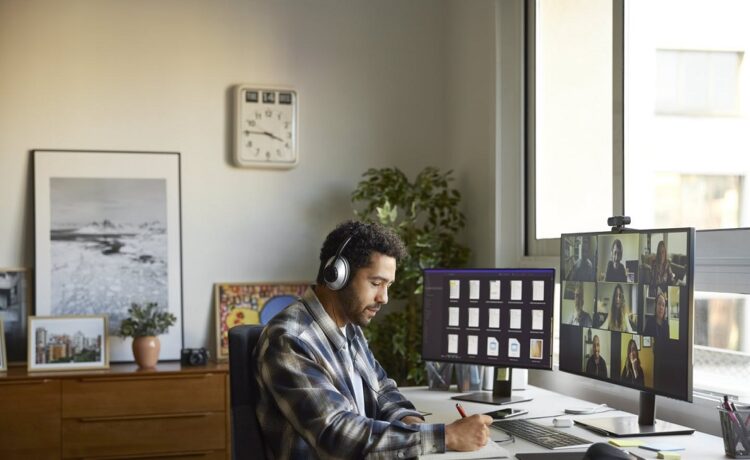
- Placing the monitor at eye level
- Leaving enough space for writing and devices
- Removing unnecessary objects from the desk surface
A clean layout helps maintain mental clarity during work sessions.
Improve Lighting for Better Focus
Proper lighting reduces eye strain and supports longer productive working periods.
Lighting improvements that help productivity include:
- Using natural daylight whenever possible
- Adding an adjustable desk lamp
- Avoiding harsh overhead glare
- Choosing neutral white lighting for clarity
Balanced lighting supports both comfort and accuracy in work tasks.
Reduce Noise and Distractions
A quiet environment allows deeper concentration and faster task completion.
Practical ways to reduce distractions include:
- Using soft furnishings that absorb sound
- Closing doors during work hours
- Turning off unnecessary notifications
- Keeping entertainment devices outside the workspace
Minimizing distractions supports consistent workflow throughout the day.
Organize Storage for Easy Access
Efficient storage reduces clutter and keeps important materials easy to locate.
Useful storage improvements include:
- Installing wall mounted shelves
- Using drawer organizers for stationery
- Keeping labeled folders for documents
- Adding compact cabinets beside the desk
Organized storage prevents time loss caused by searching for items.
Manage Cable Arrangement for a Cleaner Workspace
Cable clutter can make a workspace feel crowded and distracting.
Simple cable management solutions include:
- Using cable clips to guide wires
- Installing cable trays under desks
- Grouping chargers in one location
- Keeping extension boards safely positioned
A tidy workspace improves both appearance and functionality.
Add Personal Elements That Support Motivation
A workspace should feel comfortable without becoming distracting. Thoughtful personal touches can improve mood and engagement.
Effective additions include:
- A small indoor plant
- A calendar or planner board
- Framed motivational reminders
- Comfortable desk accessories
Balanced personalization helps create a welcoming environment for daily work.
Maintain Proper Screen Position and Viewing Distance
Correct monitor placement protects eye health and improves posture during long working hours.
Recommended adjustments include:
- Keeping the screen at eye level
- Maintaining comfortable viewing distance
- Positioning screens directly in front of the user
- Adjusting brightness according to room lighting
Proper screen setup reduces fatigue and supports sustained concentration.
Establish a Consistent Work Routine Within the Workspace
Productivity improves when the workspace supports structured habits.
Routine supporting practices include:
- Starting work at the same time daily
- Keeping a task list visible on the desk
- Taking short scheduled breaks
- Ending work at a fixed time each day
Consistency helps the mind associate the workspace with focused activity.
Frequently Asked Questions
What size desk is suitable for a home office setup
A desk that comfortably fits your computer writing space and essential tools without crowding the area is ideal for maintaining productivity.
Can a home office be created in a small apartment
Yes a compact corner with proper lighting storage and seating can function effectively as a productive workspace.
How can I improve productivity without buying new furniture
Reorganizing your desk improving lighting reducing clutter and adjusting monitor placement can make a noticeable difference.
Is natural light necessary for a productive home office
Natural light is helpful but adjustable task lighting can provide similar benefits when positioned correctly.
How often should a workspace be reorganized
Regular weekly organization helps maintain efficiency and prevents clutter from building up.
Should work and relaxation areas be separated at home
Yes separating these areas helps maintain focus during work hours and improves mental balance after work.
What colors support productivity in a home office
Neutral shades such as soft white light grey and muted blue tones often support concentration and reduce visual distraction